


Prevent Emails From Going To Spam
Email Marketing (IPv6 Supported) is a service that allows you to send a large number of emails at a time in order to advertise products, services, communicate with existing customers and look for new potential customers. Email marketing helps you save a lot of time, decrease marketing cost and get more valuable orders.
Key Features
Custom Domain Authentication
Authenticate your sending domains with DKIM and SPF records to improve your sender reputation and increase email deliverability.
Smart Content Analysis
Our tools automatically scan your email content against known spam filters and suggest optimizations to avoid triggering these filters.
A/B Testing for Campaigns
Stay informed with continuous monitoring of blacklists. We'll notify you if your domain gets listed and assist with the delisting process.
Hear from Our Satisfied Clients
Read testimonials from businesses that have successfully improved their email open rates and minimized spam issues with our help. Real stories from real clients to illustrate the effectiveness of our solutions.

Check the Reliability of Domain Names
Ensure that your domain is not on a blacklist by checking through tools like MXToolbox. If your domain appears on any blacklists, it’s advisable to address this issue promptly.
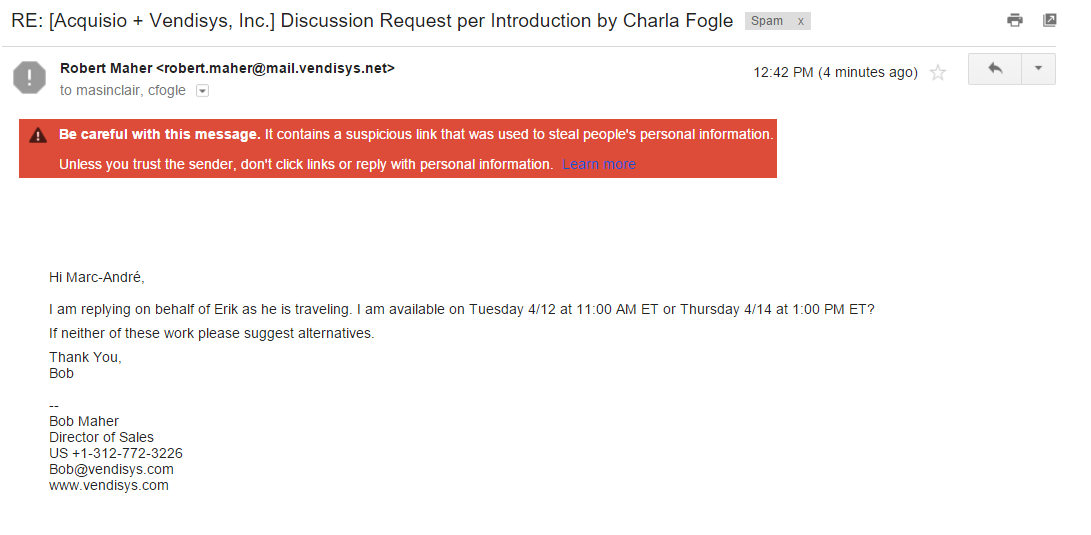
Note: Google is currently updating its spam filters, which means that emails containing links may be flagged as SPAM. These warnings often include a message cautioning you about links that could be suspicious or harmful. It’s crucial to verify that the domain of any link in your emails is not listed on major anti-spam databases such as Spamhaus, SpamCop, or Barracuda. Before sending important emails, particularly to addresses like Gmail that actively monitor for spam, send a test email to confirm that your content is not being blocked or marked as spam.
The included email example highlights a caution from Gmail indicating that the email contains a link previously identified in phishing or malware activities. It is essential to ensure that all communications are trusted and secure to prevent them from being automatically directed to spam folders.
Email address
Utilizing email accounts with personalized user names can significantly improve efficiency. For example, emails such as manhcuong@yourdomain.com are preferable. Generic email addresses like info@yourdomain.com, marketing@yourdomain.com, or sales@yourdomain.com are generally less effective.
Content of email
Form:
Images: Limit the number of images, and avoid sending emails with only a large image or minimal text, as filters might not “read” the image and could categorize the email as spam.
Text Formatting: Avoid using all caps, bold, or italics throughout the entire subject line and body of the email.
Fonts and Colors: Use a consistent font style, size, and a limited color palette. Ensure text color contrasts with the background to maintain readability.
Links and HTML: Minimize the number of links, avoid short links, and restrict excessive use of HTML formatting.
Code: Do not include Javascript, embedded code, or videos within the email.
Content Transfer: Refrain from directly copying content from Microsoft Word or websites into the email without proper formatting.
Special Characters: Reduce the use of special characters and punctuation marks like multiple exclamation points.
Attachments: Opt for sharing links rather than attaching files directly to the email.
Unsubscribe Option: Always include an unsubscribe link to allow recipients to opt out easily.
Content:
Personalization: Tailor the email content and maintain a polite tone to demonstrate that the email is intended for the recipient.
Keywords: Avoid using language that triggers spam filters, such as “free,” “guarantee,” “risk-free,” and terms commonly associated with spam.
Company Information: The footer should include concise information about the company, such as address and contact details.
Spam Phrases: Steer clear of phrases like “Click here,” “Once in a lifetime opportunity,” or “Make money fast.”
Subject Line: Ensure the subject line and content are not identical and capture the main message succinctly.
SPAM Check: Utilize SPAM check tools available in email editing software to ensure your content scores low on spam likelihood, ideally around 1.5, with no spam keywords detected.
Ways to Send Email:
Recipient Management: Avoid sending emails to multiple recipients within the same company to prevent the emails from being blocked by firewalls.
Testing: Send test emails to various providers (e.g., Gmail, Yahoo) and verify if they land in the spam folder.
Frequently Asked Questions
Got questions about Email Monitoring Services? Here are answers to some of the most common inquiries we receive. If you need more details, don’t hesitate to contact us!
What causes emails to go to spam?
Emails can end up in spam for various reasons including poor sender reputation, lack of proper domain authentication, spammy content, and high complaint rates. Our service addresses these issues to enhance your email deliverability.
How does domain authentication help?
Domain authentication (such as SPF, DKIM, and DMARC) proves that your emails come from a legitimate source and significantly reduces the chances of them being flagged as spam by recipient email servers.
Can I monitor the status of my emails in real-time?
Yes, our platform includes real-time monitoring tools that provide insights into your email performance. You can track delivery rates, bounces, and responses to understand and improve your email strategy.
What is content analysis, and how can it prevent emails from going to spam?
Our content analysis tool scans your emails against common spam triggers and provides recommendations to adjust your content. This ensures that your emails comply with best practices and stay out of spam folders.
How do you handle blacklists?
If your domain is blacklisted, it can severely affect email deliverability. We monitor blacklists continuously and alert you if your domain is listed. Our team also provides support for delisting procedures.
What kind of support do you offer for new users?
We offer comprehensive support for all our users, including onboarding sessions, detailed documentation, and a dedicated customer service team ready to assist you with any questions or issues you might encounter.